
Charge Customers for Container Rental
This topic explains how to set up a daily rental fee, usually for roll-off containers. Once a container placement is set up correctly Trash Flow automatically charges the rental fee when appropriate.
Before You Begin
You need both the Advanced Billing and Containers modules of Trash Flow. You should also set up a variable-rate bill code for the daily rate you want.
Set Up the Placement
- Open a container placement on the customer's account.
- Go to the Rates tab.
- Enter the bill code to use on the Rental line..
- If you want to give the customer some Free Rental Days, click the Terms tab and enter that number here.
Use Work Orders to Charge the Customer
Once the placement is set up you can use work orders to track the work done for the customer and charge them. Container rental is usually charged for all work after the initial delivery.
- Create a work order to dump and return, swap containers, or do the final pull.
- Once the work has been done financially Complete the work order from customer history, the Dispatch window, or Billing > Work Order Completion.
- The work order completion screen shows how many rental Days the customer will be charged for.(Trash Flow compared the Date of Last Pickup from the placement with the current business date.) Use the arrow keys (< >) to change that number of days, if desired.
- Once the screen is set the way you want it, click Save & Exit.
When You're Done
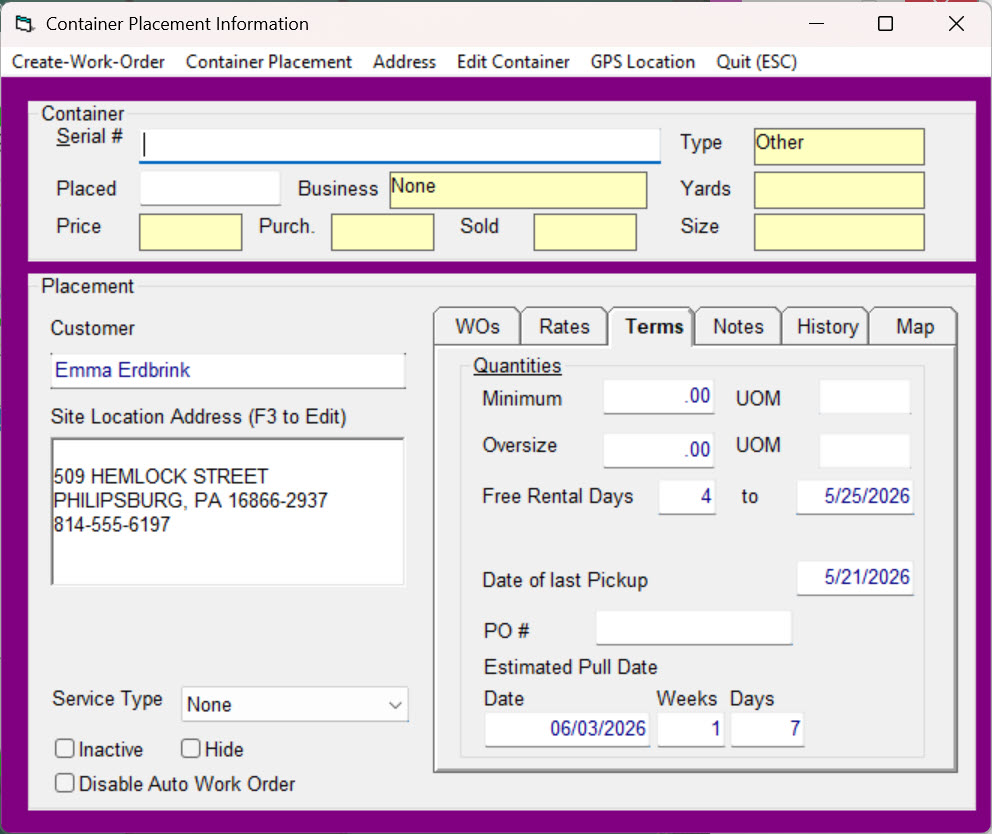
Trash Flow automatically sets the Date of Last Pickup on the Terms tab of the placement with the work order completion date. It adds any Free Rental Days to that date and saves the date in the to field above the date of last pickup. If the customer gets no free rental days then that date will be the same as the Date of Last Pickup. Here's an example of how the placement looks now.
Charge Rental Days When Assessing Charges (optional)
Some haulers also assess regular charges to their rolloff customers every month. This process charges customers for rental days by comparing the Date of last Pickup on the placement with the Assessment Period End date of the billing. In the example above, when assessing charges from 5/1 to 5/31 the customer would be charged rent from 5/25 through 5/31. Companies do this to ensure that customers won't go more than a month with a container without seeing the rental charges.
See Also
Understanding Container Placements