
Create a TeleRoute Fuel Stop Report
This article explains how to create a TeleRoute Fuel Stop Report in Trash Flow.
Before You Begin
You must have active licenses for Address Verification Service (AVS) and TeleRoute, and you must have fuel stations entered into your routes.
Context
This report can help you keep track of fuel stops made along drivers' routes.
Create the Report
-
From the Trash Flow tilebar, click Reports > TeleRoute Reports > TR Fuel Stop Report. The TeleRoute Fuel Stop Report window opens.
- Click the arrow buttons to select the date range.
Tip: Right-click the arrows to sort through dates one week at a time rather than day by day. - Use the drop-down menus to apply any filters like Driver, Truck, or Fuel Station.
- Choose whether to sort the report by route, driver, or truck.
- OPTIONAL: Click the checkbox labeled Show Report Criteria to display the filters you’ve chosen on the report.
- Use the drop-down menu to choose report format.
- Click the checkbox labeled Preview to view a PDF preview of your report.
- Click OK to print or review the report. The TeleRoute Fuel Stop Report opens.
When You're Done
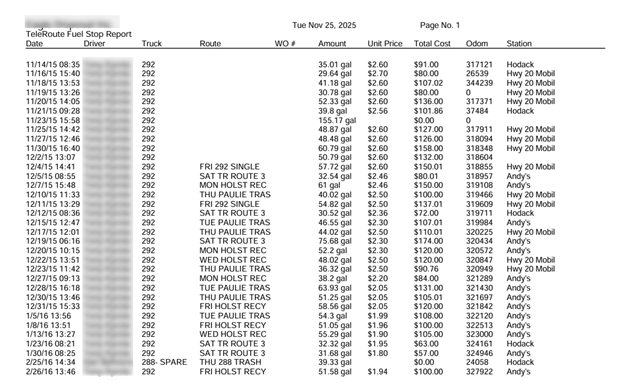
See below for a sample of the TeleRoute Fuel Stop Report.
See Also
For help creating other TeleRoute reports, see the articles below.