View a Customer's TrashBilling.com Account
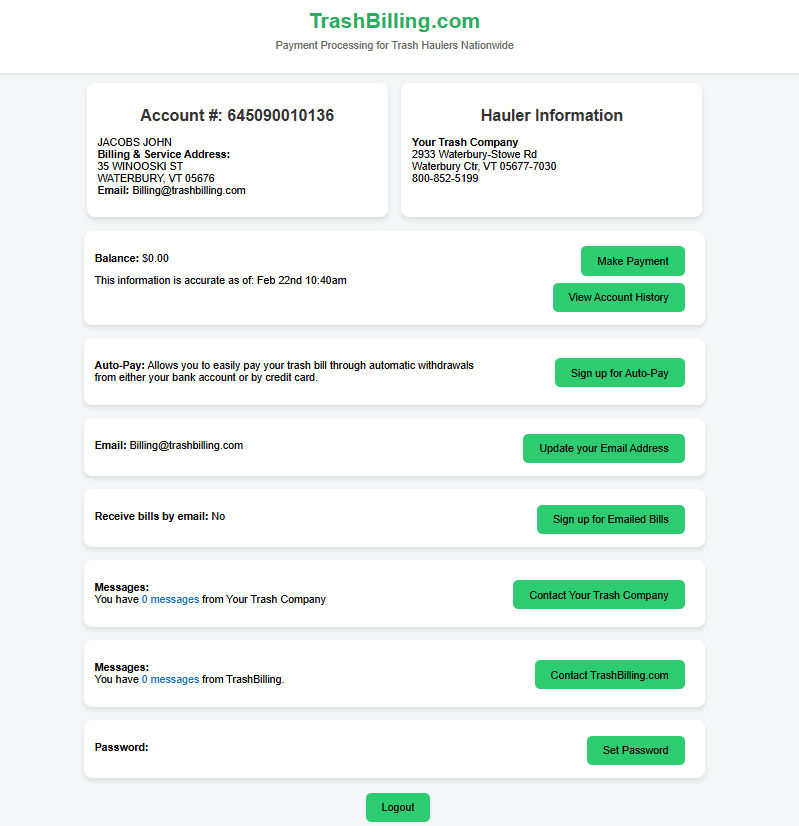
This article will explain how to view a customer's TrashBilling.com account in read-only mode in Trash Flow.
Context
Your customers can always contact Trash Billing directly for account questions and login questions, but we can only help them figure out how much they owe — we can't explain the services or the specifics of their bill. If a customer doesn't understand what they owe, this feature can help you break it down for them.
Before You Begin
Make sure that your customer uses TrashBilling.com.
Viewing Your Customer's TrashBilling.com Account
-
From an open customer card, click File > View TB.com. A new window displaying information from the customer's Trash Billing account opens.
Tip: For help opening a customer card, see Finding a Customer Account.
When You're Done
An example of a sample customer's TrashBilling.com account is shown below. You can use this screen to:
-
View account balance
-
Review payment history
-
Check contact information (name, address, email, phone)
Most of the buttons here will be clickable so you can see what the customer does, but as a safety measure this screen blocks most functions from completing. You will not be able to:
- run a payment;
- cancel a scheduled payment;
- change the password;
- change the card or bank account or autopay; or
- send messages.