
Create a Missed Stops Report
Description
This explains how to print a report of route stops for which the driver recorded no activity.
Before You Begin
You must have the Routing module and active licenses for AVS and TeleRoute. A driver must have used TeleRoute in order to get this report.
Context
Drivers using TeleRoute should normally finish each stop by tapping either Picked Up, Trash Not Out, Bin Blocked, or Stop Skipped. This report shows all stops where the driver didn't make an entry.
Create the Missed Stops Report
- Click Reports > Routes > TeleRoute Reports > Missed Stops Report.
- Enter a Start Date and End Date that you want the report to cover.
- Use the Route, Truck, and Driver fields to narrow down what to examine, if desired.
- Choose whether to Include Skipped Stops and Show Phone #s.
- Choose a Format, either a PDF Printout or Export to CSV.
- Choose whether the report should Sort by route, driver, or truck.
- Click OK to review the report.
When You're Done
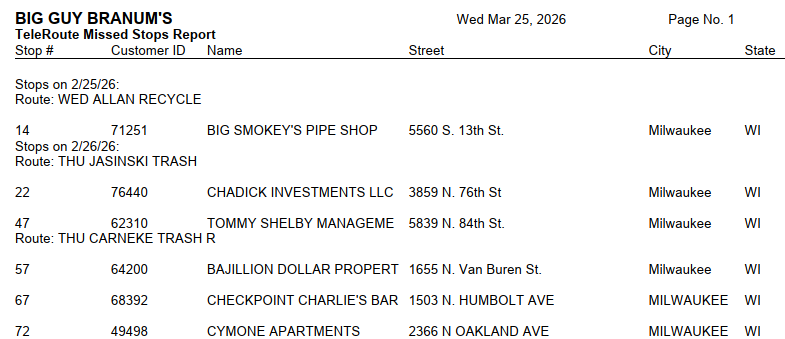
The picture above shows a sample of the report output. It will list only the stops for which there was no TeleRoute activity recorded each time the route was run in the date range provided.