
Reference: Notifications
This article lists all the notification types in Trash Flow along with the information they provide. It also explains which information each type includes, along with buttons you can click like View Image or Unsuspend Customer on certain notification types. Notifications come in five types:
- System
- General
- Trash Billing
- TeleRoute Exceptions; and
- Messages.
For all exceptions that show a customer name, click the name to open their account window.
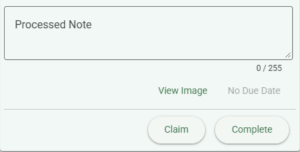 All notifications have a button. Clicking assigns the notification to you. Only one person can be assigned to a notification, so if that button is grayed out it means another user has already claimed it. Claimed notifications include the user's name above the date. Some notifications will have a Processed Note field where you can enter your own notes before completing the notification. There is also a button to or the notification. These buttons mark the notification as finished and archive it, removing it from the notification list.
System
System notifications include problems connecting to your database, slow speed warnings, and errors connecting to particular Trash Flow services (Trash Billing, customer messages, etc.).
- Message System Unreachable: Date and time received, title, explanation, due date.
General
General notifications are manually sent by us at Trash Flow. They'll include the date and time received, title, explanation, and due date. Reasons for sending might include:
- we just released an important Trash Flow update;
- there's a temporary problem in credit card processing;
- an upcoming holiday will affect the timing of bank deposits from Trash Billing;
- email delivery is taking unexpectedly long.
Trash Billing
- Payment by Suspended Customer:
- date and time received by Trash Flow;
- customer name and account balance;
- suspended date;
- balance;
- payment type (Web Payment, Direct Pay, etc.);
- payment amount; and
- payment date.
Click Unsuspend to make the account active again. - Payment by Ended Customer:
- date and time received by Trash Flow;
- customer name and account balance;
- ended date;
- balance;
- payment type (Web Payment, Direct Pay, etc.);
- payment amount; and
- payment date.
Open the customer account and remove the end date to restart their service.
- Invalid Customer: WebID, customer email, payment type (Web Payment, ARC, etc.), payment amount, payment date, and credit card number or bank routing & account number. These usually occur when a customer makes a typo when entering their webID number to pay online. The payment goes through, but Trash Flow can't tell which customer account should get the credit.
TeleRoute Exceptions
Certain activities in TeleRoute can be set as "exceptions," events that Trash Flow users want to know about as they happen throughout the driver's day. Those options are set in .
- Picked Up with Driver Note: Date and time received by Trash Flow, customer name and account number, date and time the driver recorded the activity, associated container placement, route name, and driver note.
- Trash Not Out: Date and time received by Trash Flow, customer name and account number, date and time the driver recorded the activity, associated container placement, route name, and driver note.
- Dumpster Blocked: Date and time received by Trash Flow, customer name and account number, date and time the driver recorded the activity, associated container placement, route name, and driver note.
- Extras: Date and time received by Trash Flow, customer name and account number, date and time the driver recorded the activity, associated container placement, route name, description of route extra, and driver note.
- Route Image: Date and time received by Trash Flow, customer name and account number, date and time the driver recorded the activity, associated container placement, route name, and driver note. Click the button to see the picture without opening the customer's account.
- Note: Date, associated container placement, route name, driver note.
- Move After Prev. Stop: Date and time received by Trash Flow, customer name and account number, date and time the driver recorded the activity, associated container placement, route name, and driver note. The notification lists the customer's current stop number, then the previous customer's name and stop number. Click to move the route stop, or to disregard the driver's request.
- Work Order Note: Date and time received by Trash Flow, work order number, date and time the driver recorded the activity, associated container placement, driver note.
Messages
Messages are received and processed by Trash Flow's email servers. Customers can send you a message after logging in to TrashBilling.com.
- Customer Message: Date and time received by Trash Flow, subject line, customer's name and account number, email address, date sent, "From" line, subject, and message. If the message is part of a longer conversation earlier those emails appear below.
- Customer Email Undelivered [webID]: Customer's name and account number, date and time bounceback message received, "From" line, subject, and message that the customer's email server rejected the message.
Keyboard Shortcuts In the Notifications Window
| Shortcut | Command |
| F1 | Help |
| F4 | Toggle Notification List |
| F5 | Toggle Task List |
| F6 | Edit Due Date |
| F7 | Claim/Unclaim |
| F8 | Settings window |
| F9 | Archive/Active |
| F12 | Complete |
| PG DN | Move down Notification or Task list |
| PG UP | Move up Notification or Task list |
| ESC | Close window |
| ENTER (with notification selected) | Open notification |