
Create a Completed Reminders Report
This page explains how to create a report showing reminders completed within a selected date range.
Before You Begin
You must have reminders that you've created and completed in Trash Flow.
Context
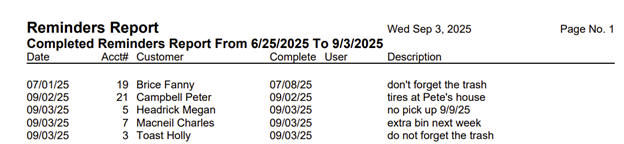
The Completed Reminders Report shows reminders that have been completed in the reminders window. This can help you organize and analyze past completed reminders without searching through the full reminders list. You can generate reports sorted by user, date range, and customer to track completed work in Trash Flow.
Create the Completed Reminders Report
-
From the Trash Flow tilebar, click Reports > Reminder Reports > Completed Reminders. The Reminders Report window opens.
-
Use the arrow buttons to select Start Date and End Date.
-
Choose your business(es) from the Business drop down menu.
-
Select Users if needed.
Tip: This specifies who the reminder was assigned to.
-
Use Sort by to sort your reminders by date, customer, or user.
-
Click OK to generate and review the report.
When You're Done
The Completed Reminders Report opens. See the example below:
See Also
Visit these pages for help creating other types of Reminders Reports.